Blog
Golden Rectangle Formula
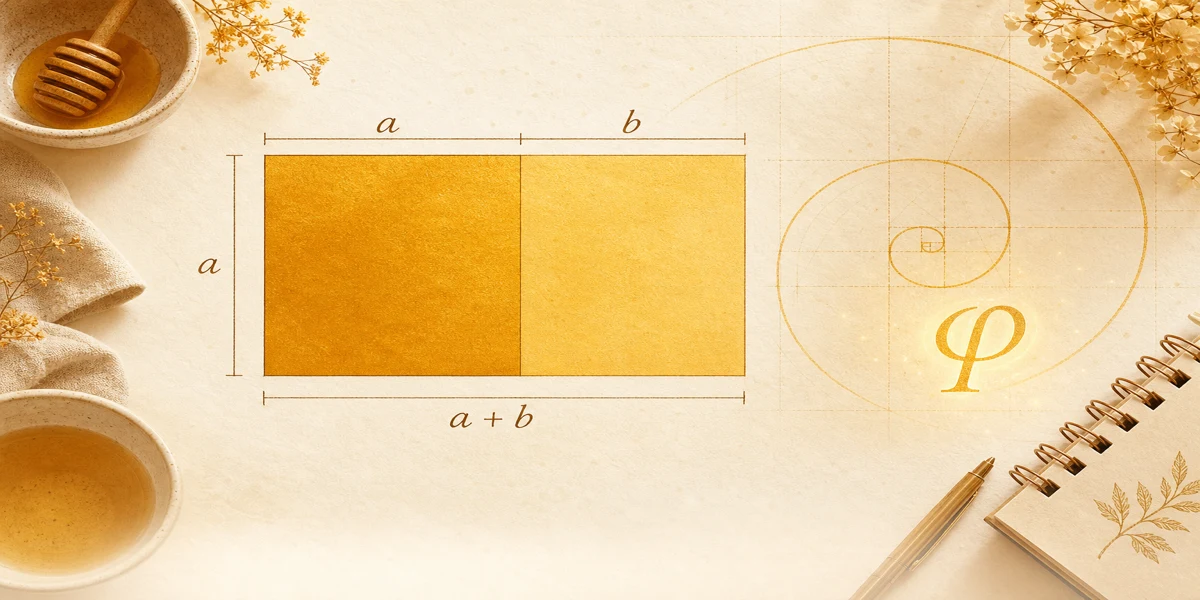
Every golden rectangle formula on one page: core ratio, side swaps, total width, and area, tied to the diagram used by our calculator.
By Golden Rectangle Calculator Team

Blog
Every golden rectangle formula on one page: core ratio, side swaps, total width, and area, tied to the diagram used by our calculator.
By Golden Rectangle Calculator Team
Core rule: (a + b) ÷ a = a ÷ b = φ. The Golden Rectangle Calculator computes b = a ÷ φ or a = b × φ instantly.
Formula
This article collects the relationships the Golden Rectangle Calculator uses under the hood. If you can read these lines, you can predict calculator output by hand.
Formulas are easier when you fix the diagram first: a is the square side, b is the strip, total width is a + b.
Some books swap which side is longer in prose. This site keeps a as height and uses b only for the right strip.
Carry at least six decimals of φ for school work; round only at the end for reporting.
The golden rectangle formula is really two equal ratios. Total width over height equals height over strip width, and both equal φ.
Height equals a because the square sets the vertical span. Total width splits into the square’s width a plus the strip width b, which is why how to calculate a golden rectangle starts by choosing which of those you know.
Area always uses the outer rectangle: height a times total width (a + b). The product a × b is only the right-hand piece, not the full golden area.
When you solve b = a ÷ φ, you are enforcing a ÷ b = φ. When you solve a = b × φ, you are enforcing the same relationship from the strip inward.
From square side a: compute strip b, add for total width, multiply for area. From strip b: multiply to get a, then repeat.
Geometrically, total width is φ times the height because (a + b) ÷ a = φ. That single line is what many designers memorize.
Numeric tables and design-sized samples live in golden rectangle examples, including pixel and centimeter cases you can paste into the tool.
Mirror these steps when you validate homework or a Figma frame.
Given a = 10 cm: b = 10 ÷ φ ≈ 6.180 cm. Total width a + b ≈ 16.180 cm.
Area = 10 × 16.180 ≈ 161.8 cm². Both ratio checks return about 1.618.
Enter a = 10 in the calculator to see matching rounded values.
If a problem gives total width first, subtract a to get b, then still verify with φ rather than assuming the figure is golden.
Golden rectangle math boils down to two equal ratios and three derived values: the missing side, a + b, and area.
Memorize b = a ÷ φ and a = b × φ, then verify every result.
Practice with the home calculator to build speed before design deadlines or exams.
Golden rectangle and Fibonacci sequence: how ratios approach φ, exact side math vs integer pairs, and checks with our free calculator.
Golden rectangle in design for web layout, logos, UI, and photography. Set width a + b from height a using φ and the free calculator.
Golden rectangle vs golden ratio: how φ differs from labeled sides, when to use each idea, and ties to the free dimension calculator.