Blog
Golden Ratio Calculator Explained
Understand φ (phi), how to verify golden ratios on measured rectangles, and when to use the home rectangle calculator instead of ratio-only math.
By Golden Rectangle Calculator Team

Blog
Understand φ (phi), how to verify golden ratios on measured rectangles, and when to use the home rectangle calculator instead of ratio-only math.
By Golden Rectangle Calculator Team
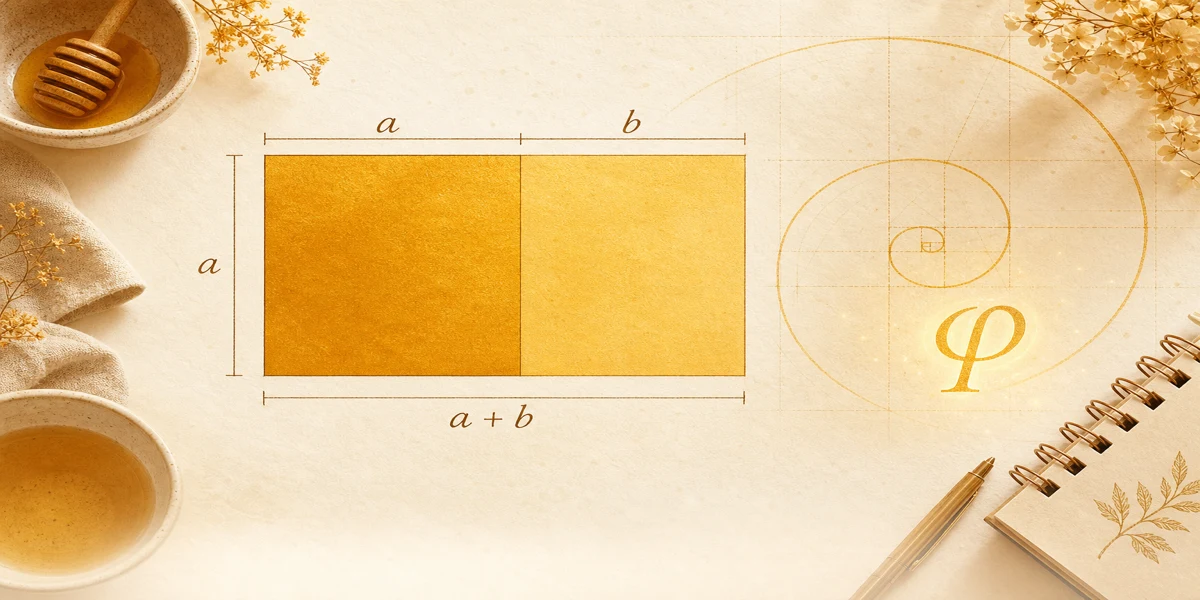
φ ≈ 1.6180339887. The Golden Rectangle Calculator applies φ to labeled sides a and b on a golden rectangle.
Formula
This article explains φ and ratio checks, while the Golden Rectangle Calculator solves labeled sides for a specific diagram.
A golden ratio calculator in the abstract divides two lengths and compares the quotient to φ.
Rectangle work adds geometry: which segment is height, which is strip, and what total width means.
Keep both ideas: φ as a number, and the golden rectangle as the standard picture on this site.
φ is the positive solution to x² = x + 1, equivalently (1 + √5) ÷ 2.
It appears as the limit of consecutive Fibonacci ratios and as the fixed ratio in golden rectangle definitions.
Designers quote φ for quick mental math; engineers may need more decimals from a calculator constant.
Read {{linkB}} when you need the square-plus-strip vocabulary before verifying real measurements.
To test a drawn rectangle, measure height a, strip b, and confirm both ratios match φ.
If only one ratio fits, relabel or remeasure. Mixed labels are a common lab error.
Conceptual differences between φ alone and labeled rectangles appear in {{linkA}}.
Works in the field with a tape measure or on screen with pixels.
φ to ten decimals: 1.6180339887. Rounding to 1.618 early can shift area by noticeable amounts on large facades.
Measured (a + b) ÷ a = 1.62 may be golden within 0.002 tolerance, but 1.60 likely is not.
After manual checks, enter the same sides in the calculator to compare.
Document the φ constant you used in reports so teammates can reproduce checks.
φ is the benchmark number behind golden rectangle checks.
Verify with two ratios whenever you measure real objects.
Use the home tool when you already know a or b in the standard layout.
Golden rectangle and Fibonacci sequence: how ratios approach φ, exact side math vs integer pairs, and checks with our free calculator.
Golden rectangle in design for web layout, logos, UI, and photography. Set width a + b from height a using φ and the free calculator.
Golden rectangle vs golden ratio: how φ differs from labeled sides, when to use each idea, and ties to the free dimension calculator.